Drupal is a powerful content management system known for its flexibility, scalability, and robustness—qualities that make it a preferred choice for developers building complex and high-performance websites. One of Drupal’s most appealing features is its theming system, which allows complete control over the presentation layer of your website. If you want a unique look and feel tailored to your brand, Drupal theme development through custom themes is the way to go.
In this guide, we’ll walk through everything you need to know about custom theme development in Drupal, including setup, file structures, best practices, and customization tips.
Drupal offers various contributed themes that are plug-and-play, but when you’re aiming for a design that reflects your brand’s identity, Drupal custom theme development becomes essential. Custom themes allow you to control every design element—layout, fonts, colors, and responsive behavior—making your site truly one of a kind.
Whether you’re building a corporate site, an eCommerce store, or a government portal, a custom theme ensures you don’t compromise on design or functionality.
Setting Up Your Drupal Custom Theme
Before diving into code, ensure you have a local development environment ready with Drupal installed. Drupal 10 is the latest stable release and is recommended for new projects.
To begin theme development in Drupal, follow these steps:
1. Create a Theme Folder
Navigate to the /themes/custom/ directory inside your Drupal installation and create a. new folder for your theme, e.g., my_custom_theme.
2. Define Your Theme with .info.yml
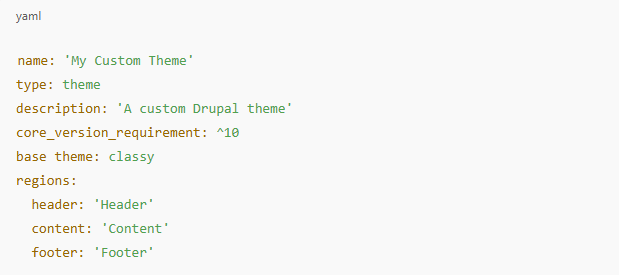
Create an .info.yml file in your theme folder (e.g., my_custom_theme.info.yml). Here’s a basic example:
This file tells Drupal about your theme and defines regions you can place blocks in.
3. Add Theme Libraries
Next, create a my_custom_theme.libraries.yml file to declare CSS and JavaScript files. For instance:
Then, attach the library to your .info.yml file:
File Structure for Custom Themes
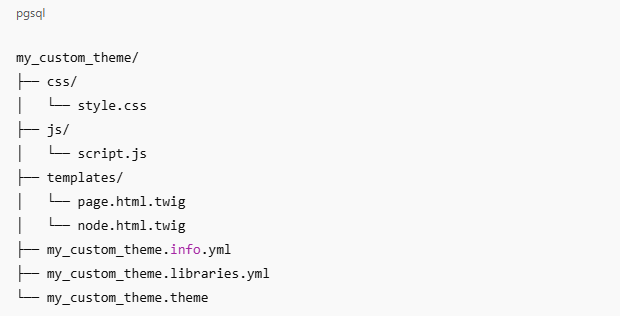
A well-structured theme makes your development process smoother and more maintainable. A standard file structure for a Drupal custom theme might look like this:
Use the templates/ directory to override Drupal’s default HTML structure using the Twig templating engine.
Customizing Your Theme
After setting up your custom theme, it’s time for Drupal theme customization. Twig templates allow you to create highly customizable layout files for different parts of your website.
For example, to customize the node display:
Copy the core node.html.twig file into your theme’s templates/ folder.
Modify the markup to suit your design.
Clear the cache (drush cr or via the admin panel) to apply changes.
Additionally, you can override block templates, region templates, and more by copying their respective Twig files into your theme directory and renaming them based on naming conventions.
Using Theme Suggestions
Drupal provides theme hook suggestions, which are automatically generated template file names based on the context. For example, page–front.html.twig is used for the homepage, and node–article.html.twig is used for Article content types.
This feature adds great flexibility to your Drupal theme customization, allowing you to create a distinct layout for different pages or content types.
Adding Custom Regions and Blocks
You can define as many regions as needed in your .info.yml file. Once defined, these regions appear in the Block Layout interface in the admin UI, making it easy to assign blocks visually.
You can then print these regions in your page.html.twig file using:
Styling and Responsiveness
With your HTML structure in place, the next step is styling. Use your style.css to add global styles, and don’t forget to include responsive design using media queries or a front-end framework like Bootstrap or Tailwind CSS.
If you’re working on a complex theme, consider integrating a front-end build system (e.g., Gulp, Webpack) to manage CSS pre-processing (SASS/SCSS), JavaScript minification, and image optimization.
Here are some best practices to follow during Drupal theme development:
Use base themes like Classy or Stable to reduce redundant code.
Leverage Twig Debugging to identify which templates are in use.
Organize your files clearly and comment your code.
Avoid inline styles; keep CSS in separate files.
Ensure accessibility and responsiveness across all devices.
Test your theme across multiple browsers to ensure cross-browser compatibility.
Keep security in mind by sanitizing outputs and following Drupal’s coding standards.
Drupal Theme Customization: Going Beyond the Basics
Once the base is ready, there’s a lot more you can do to take your theme to the next level:
Add preprocess functions in the .theme file to manipulate variables.
Use conditional classes to style elements differently based on the page.
Create custom layouts with Layout Builder or Paragraphs for more flexibility.
If you’re working with a team or need an enterprise-grade solution, it’s best to consult with a Drupal Development Company that can deliver scalable and secure solutions tailored to your project needs.
Conclusion
Creating a custom Drupal theme gives you unmatched control over your website’s look and feel. Whether you’re aiming for a minimalist blog, a complex corporate portal, or a feature-rich eCommerce site, custom themes allow you to align design with functionality seamlessly.
By mastering theme development in Drupal, learning to leverage Twig, understanding the file structure, and applying best practices, you’ll be well on your way to delivering visually engaging and user-friendly Drupal websites. Start small, experiment often, and continue customizing until your website reflects your brand’s exact personality.
If you’re serious about your site’s performance and brand identity, investing time in Drupal theme customization is not just a design task—it’s a strategic advantage.